We've all used apps that try to replace an actual phone, but the functionality just isn’t there. With an app, a professional call comes in, and it looks like a random notification instead of a real call - it’s easy to miss, easy to swipe away by accident and, if you take the call, the call is never quite as smooth as the calls you actually answer every day. To call someone back, you have to open the app, find the keypad, and dial all over again.
Vodia Phone 2
We built Vodia Phone 2 to get out of your way. When a work call comes in, Vodia Phone 2 rings like a normal call. And when you want to make a call, you can use the regular phone dialer with which you’re already familiar. It feels like your phone because, to your phone, it basically is one.
Calls that ring like real calls
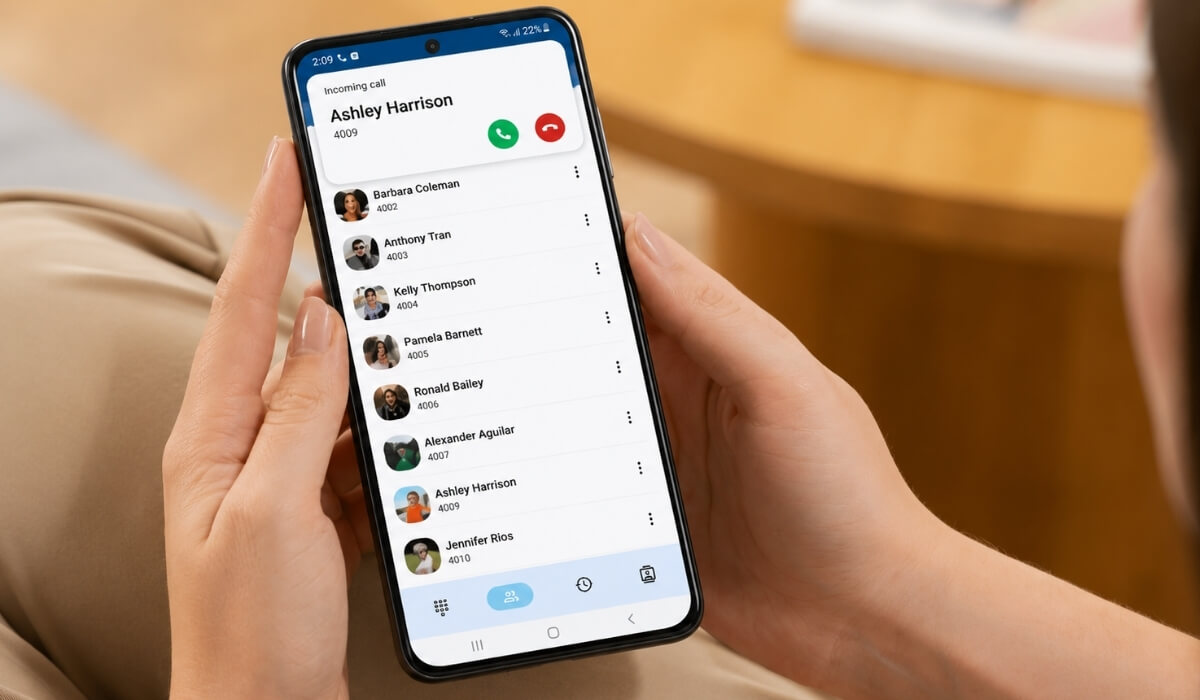
When someone calls your work number, Vodia Phone 2 doesn't bury it in a notification: it rings the way any call rings - full screen, with the caller's name and number front and center, with the same big answer and decline buttons you're used to. Vodia Phone 2 also “plays nicely” with everything else on your phone - you don't have to learn anything new, it just works the way your phone always has:
- if you're connected to your car or to a Bluetooth headset, this is where the call comes through
- if your phone is locked, you can answer directly from the lock screen
- if you're already on another call or have Do Not Disturb (DND) on, it behaves exactly as you’d expect it to
Dial the way you already do
Making a call with Vodia Phone 2 is just as easy as receiving a call. Because Vodia Phone 2 integrates directly with Android's calling framework, work calls appear and behave like regular phone calls. You can even use your regular phone dialer to place calls through your work line without opening a separate app or keypad. You dial a call the way you always have, while Vodia Phone 2 quietly handles the rest in the background.
It feels natural
A lot of calling apps try to rebuild the whole phone experience from scratch with their own ringing screen, their own dialer, their own way of handling your headset...the trouble is, it almost always ends up feeling slightly off.
Vodia Phone 2 takes the opposite approach: instead of reinventing your phone, it works with it. It uses the same built-in calling system your phone uses for every other call, so everything just clicks into place…the ringing, the answering, the headset, the lock screen. The clever, complicated functionalities that make internet calling work stay hidden under the hood, and you’re left with a simple work phone that feels exactly like the phone in your pocket.
More than just calls
Vodia Phone 2 isn't just about phone calls. It’s an app that keeps your work life in one place: a full call history so you can see whom you talked to and call him or her back with a tap, your contacts and team extensions right where you need them, text messaging for quick back-and-forth, and voicemail you can check without dialing into it.
You're in control
Vodia Phone 2 also puts you in charge of how and when you can be reached. Heading into a meeting or done for the day? Flip on DND, set a custom status so people know why you aren’t taking calls, and decide where calls should land while you have DND engaged. Call forwarding lets you send your calls wherever you need them, and service flags make it easy to switch your phone system between modes - day and night, open or closed, holiday schedule.
You can also link your smartphone so work calls reach you even when the app isn't open, and you can set the parameters as you wish: which numbers should always ring through, which ones shouldn’t, and whether your phone rings alongside the app or only when you're signed out. You can personalize your profile with your name and photo, so Vodia Phone 2 feels like your phone, your way.
The bottom line
The best part of Vodia Phone 2 is all of the things you’ll never notice while you’re using it: calls ring normally, answer normally, and sound great, whether you’re at your desk, in your car, or on the go. There's nothing new you’ll need to learn, no battle you’ll have to have on the screen of your phone. It feels like you’re on your phone, taking your work calls, communicating your way.
Get started
Download Vodia Phone 2 on Google Play and view the Vodia Phone 2 documentation for setup instructions, configuration options, and feature details.
Have questions about Vodia Phone 2? Contact us at sales@vodia.com or +1 (617) 861-3490.
.svg)