.svg)


WhatsApp Business messaging and calling
Connect WhatsApp to your PBX and manage messaging and calls from a single platform. Send and receive WhatsApp messages, route calls through your PBX, and manage conversations alongside your existing voice infrastructure.
Everything your team needs to handle conversations at scale
Connect WhatsApp Business to your PBX and manage messaging and voice interactions within the same communication platform your team already uses.

Bi-directional messaging
Send and receive WhatsApp messages directly through the PBX using the official WhatsApp Business Platform integration.

WhatsApp voice calls via SIP
Route incoming WhatsApp voice calls through your PBX infrastructure and handle them like any other call.

Native PBX routing
Deliver WhatsApp conversations to extensions, queues, or call flows using the same routing logic used for voice calls.

No middleware required
WhatsApp connects directly to the PBX through the official API and webhook configuration.

Encrypted and compliant
All communication occurs through secure connections using Meta’s WhatsApp Business Platform.

Outbound callback support
Allow users to return customer calls through PBX call flows after a customer contacts your business.
How WhatsApp Business integrates with Vodia PBX
The integration connects your PBX to the WhatsApp Business API, using webhook communication to exchange message and call events.

Connect your WhatsApp Business account
Create and configure a WhatsApp Business API account through Meta for Developers and obtain the required credentials.

Configure WhatsApp in Vodia PBX
Add WhatsApp Business API as a messaging provider in the PBX and assign your verified business number to an extension.

Verify webhook communication securely
Meta sends incoming message events to your PBX through a webhook endpoint, allowing the PBX to receive and process messages.
Once configured, your PBX can send and receive WhatsApp messages and integrate them into your communication workflows.
Messaging that works directly into your PBX
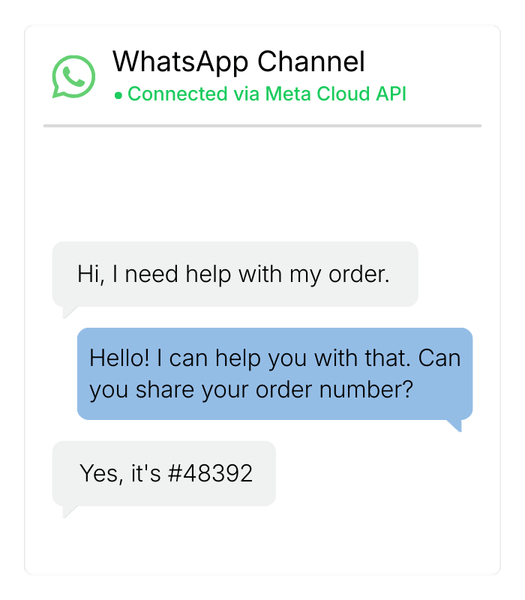
WhatsApp conversations appear directly in the Vodia user client, allowing users to send and receive messages alongside voice calls and other PBX communication channels.
With WhatsApp connected to the PBX you can:
- Send and receive WhatsApp messages directly from PBX extensions
- Deliver incoming messages to specific users or teams
- Use your existing PBX routing logic for conversations
- Handle both voice and messaging from the same system
- Keep customer communication centralized in your PBX
WhatsApp messaging supports both text and image messages, enabling richer customer conversations through the platform.

WhatsApp calls route through your PBX call flows
Incoming WhatsApp calls can be routed through PBX call flows just like SIP calls, allowing teams to handle conversations using familiar PBX routing logic.
This allows you to:
- Route WhatsApp calls to extensions
- Deliver calls to ring groups or call queues
- Apply IVR and call routing logic
- Integrate WhatsApp calls into existing PBX workflows
Voice calls become part of your PBX environment instead of being handled separately in mobile apps.
Trusted in production environments
20
490
110
45
75
Business use cases for WhatsApp PBX integration
WhatsApp conversations can also be combined with AI voice agents to automate customer interactions across messaging and voice channels. Businesses can handle inquiries, route conversations, and trigger workflows without requiring manual intervention.

Enterprise businesses
Support customer communication through a familiar messaging platform while maintaining centralized PBX control.

Customer support teams
Allow customers to reach support teams through WhatsApp and escalate conversations to voice calls when needed.

E-commerce and services
Provide a convenient communication channel for order updates, support requests, and customer inquiries.
CRM integrations for WhatsApp and PBX workflows
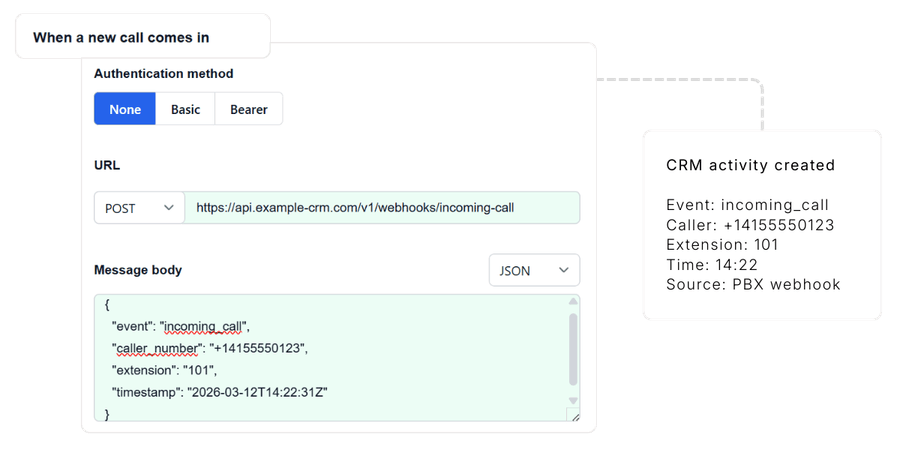
Integrate Vodia with CRM platforms to automatically log calls, link conversations to customer records, and keep sales and support teams working from a single source of truth across all interactions.
View CRM integrations →Extend WhatsApp integrations with APIs and webhooks
Use APIs and webhooks to trigger workflows, connect external services, and integrate PBX events into your business systems so communication data flows directly into your existing tools and processes.
Frequently Asked Questions
How does WhatsApp integrate with a PBX?
Can WhatsApp messages appear in a PBX client?
Can WhatsApp voice calls be routed through SIP?
Can WhatsApp integrate with CRM systems?
What is required to connect WhatsApp to a PBX?
Start using WhatsApp with Vodia
Add WhatsApp messaging and voice communication to your Vodia PBX and manage conversations alongside your existing communication channels.
Prefer to explore on your own? Launch a prepaid instance on:


