.svg)


WhatsApp Business - Nachrichten und Anrufe
Verbinden Sie WhatsApp mit Ihrer Telefonanlage und verwalten Sie Nachrichten und Anrufe über eine einzige Plattform. Senden und empfangen Sie WhatsApp-Nachrichten, leiten Sie Anrufe über Ihre Telefonanlage weiter und verwalten Sie Unterhaltungen parallel zu Ihrer bestehenden Telefonie-Infrastruktur.
Alles, was Ihr Team braucht, um Gespräche in großem Umfang zu bewältigen
Verbinden Sie WhatsApp Business mit Ihrer Telefonanlage und verwalten Sie Nachrichten und Telefonate über dieselbe Kommunikationsplattform, die Ihr Team bereits nutzt.

Bidirektionale Nachrichten
Senden und empfangen Sie WhatsApp-Nachrichten direkt über die Telefonanlage mithilfe der offiziellen Integration der WhatsApp Business Plattform.

WhatsApp Anrufe über SIP
Leiten Sie eingehende WhatsApp-Sprachanrufe über Ihre Telefonanlagen-Infrastruktur weiter und bearbeiten Sie sie wie jeden anderen Anruf.

Natives PBX Routing
Leiten Sie WhatsApp-Chats mithilfe derselben Routing-Logik, die auch für Sprachanrufe verwendet wird, an Nebenstellen, Warteschlangen oder Anrufabläufe weiter.

Keine Middleware benötigt
WhatsApp wird über die offizielle API und die Webhook-Konfiguration direkt mit der Telefonanlage verbunden.

Verschlüsselt und konform
Die gesamte Kommunikation erfolgt über sichere Verbindungen unter Nutzung der WhatsApp Business Platform von Meta.

Rückrufunterstützung
Ermöglichen Sie es Benutzern, Kundenanrufe über PBX-Anrufabläufe zurückzurufen, nachdem ein Kunde Ihr Unternehmen kontaktiert hat.
Wie WhatsApp Business sich in die Vodia PBX integriert
Die Integration verbindet Ihre Telefonanlage mit der WhatsApp Business API und nutzt dabei die Webhook-Kommunikation zum Austausch von Nachrichten- und Anrufereignissen.

Verbinden Sie Ihr WhatsApp Business-Konto
Erstellen und konfigurieren Sie über „Meta for Developers“ ein WhatsApp Business API-Konto und rufen Sie die erforderlichen Anmeldedaten ab.

WhatsApp in der Vodia-Telefonanlage konfigurieren
Fügen Sie die WhatsApp Business API als Messaging-Anbieter in der Telefonanlage hinzu und weisen Sie Ihre verifizierte Geschäftsnummer einer Nebenstelle zu.

Webhook-Kommunikation sicher überprüfen
Meta sendet Ereignisse zu eingehenden Nachrichten über einen Webhook-Endpunkt an Ihre PBX, sodass diese die Nachrichten empfangen und verarbeiten kann.
Nach der Konfiguration kann Ihre Telefonanlage WhatsApp-Nachrichten senden und empfangen und diese in Ihre Kommunikationsabläufe integrieren.
Nachrichten, die direkt in Ihrer PBX landen
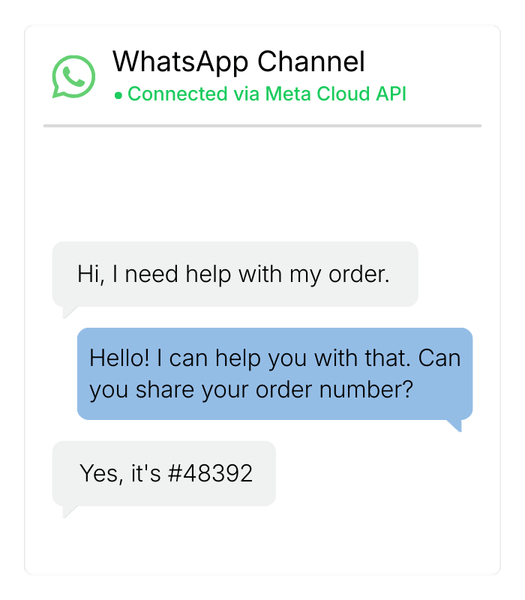
WhatsApp-Chats werden direkt im Vodia-Benutzerclient angezeigt, sodass Nutzer neben Sprachanrufen und anderen PBX-Kommunikationskanälen auch Nachrichten senden und empfangen können.
Wenn WhatsApp mit der Telefonanlage verbunden ist, haben Sie folgende Möglichkeiten:
- WhatsApp-Nachrichten direkt von PBX-Nebenstellen senden und empfangen
- Eingehende Nachrichten an bestimmte Benutzer oder Teams weiterleiten
- Bestehende PBX-Routing-Logik für Gespräche nutzen
- Verwalten Sie sowohl Anrufe als auch Nachrichten über ein und dasselbe System
- Zentralisieren Sie die Kommunikation in Ihrer PBX
WhatsApp unterstützt sowohl Text- als auch Bildnachrichten und ermöglicht so umfangreichere Kommunikation über die Plattform.

WhatsApp-Anrufe werden über die Abläufe Ihrer PBX geroutet
Eingehende WhatsApp-Anrufe können genau wie SIP-Anrufe über PBX-Anrufabläufe weitergeleitet werden, sodass Teams die Gespräche mithilfe der ihnen vertrauten PBX-Weiterleitungslogik bearbeiten können.
Das erlaubt Ihnen:
- Anrufe an Nebenstellen weiterzuleiten
- Anrufe an Rufgruppen oder Warteschlangen weiterzuleiten
- IVR und Ruflogiken anzuwenden
- WhatsApp Anrufe in bestehende PBX workflows zu intgrieren
Sprachanrufe werden Teil Ihrer Telefonanlagenumgebung und nicht mehr separat in mobilen Apps abgewickelt.
Immer noch nicht überzeugt?
20
490
110
45
75
Anwendungsfälle für die Integration von WhatsApp in die PBX
WhatsApp-Chats lassen sich zudem mit KI-Sprachassistenten kombinieren, um Kundeninteraktionen über Messaging- und Sprachkanäle hinweg zu automatisieren. Unternehmen können so Anfragen bearbeiten, Chats weiterleiten und Arbeitsabläufe auslösen, ohne dass ein manueller Eingriff erforderlich ist.

Großunternehmen
Unterstützen Sie die Kundenkommunikation über eine vertraute Messaging-Plattform und behalten Sie dabei die zentrale Steuerung der Telefonanlage bei.

Kundensupport-Teams
Ermöglichen Sie es Kunden, Support-Teams über WhatsApp zu erreichen, und leiten Sie die Unterhaltungen bei Bedarf in Telefonate weiter.

E-Commerce und Dienstleistungen
Stellen Sie einen bequemen Kommunikationskanal für Bestellaktualisierungen, Supportanfragen und Kundenanfragen bereit.
CRM Integrationen für WhatsApp und PBX workflows
Integrieren Sie Vodia in CRM-Plattformen, um Anrufe automatisch zu protokollieren, Gespräche mit Kundendatensätzen zu verknüpfen und sicherzustellen, dass Vertriebs- und Support-Teams bei allen Interaktionen auf eine einzige zuverlässige Informationsquelle zurückgreifen können.
CRM Integrationen ansehen→Erweitern Sie WhatsApp Integrationen mit APIs und Webhooks
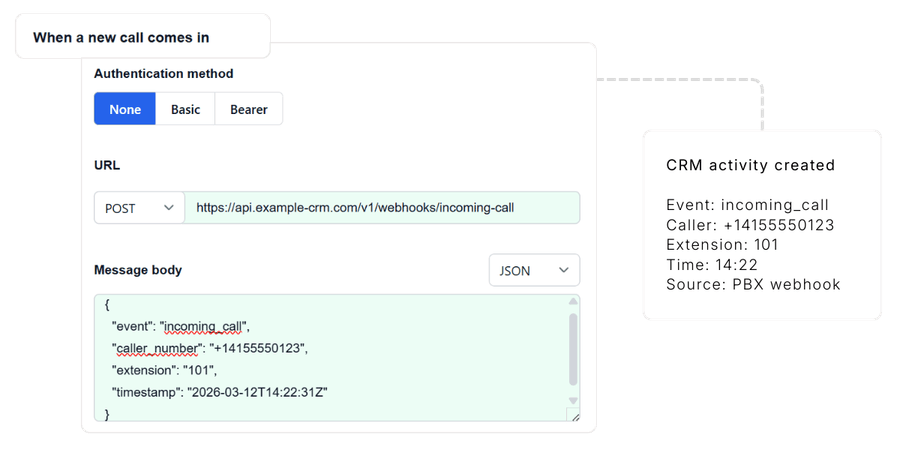
Nutzen Sie APIs und Webhooks, um Workflows auszulösen, externe Dienste anzubinden und PBX-Ereignisse in Ihre Geschäftssysteme zu integrieren, sodass Kommunikationsdaten direkt in Ihre bestehenden Tools und Prozesse einfließen.
Frequently Asked Questions
Wie lässt sich WhatsApp in eine PBX integrieren?
Erscheinen WhatsApp Nachrichten im PBX Client?
Können WhatsApp-Sprachanrufe über SIP weitergeleitet werden?
Lässt sich WhatsApp in CRM-Systeme integrieren?
Was ist erforderlich um WhatsApp mit der PBX zu verbinden?
Starten Sie WhatsApp mit Vodia zu nutzen
Erweitern Sie Ihre Vodia-Telefonanlage um WhatsApp-Nachrichten und Sprachkommunikation und verwalten Sie die Unterhaltungen parallel zu Ihren bestehenden Kommunikationskanälen.
Sie wollen sich selber überzeugen? Starten Sie eine vorausbezahlte, einsatzbereite Instanz auf...


