Jitsi Video Conferencing in V70: A Controlled Approach to Privacy
Published on:
April 21, 2026
Video conferencing is widely used, but rarely examined in terms of where it runs and who controls the infrastructure behind it. In many cases, video traffic is handled by external systems, introducing dependencies that are often overlooked. This piece explores how integrating Jitsi directly into the PBX brings video into the same environment as voice and communication management, giving organizations clearer boundaries, reduced reliance on third-party platforms, and greater control over how communication is handled.
Video conferencing has become part of everyday work. Most teams are using it almost every day, and in many organizations it’s considered an “already solved problem.” Users pick a platform, invite participants, and the call just works.
What doesn’t get much attention is where those calls actually run. In most setups, video traffic is handled by infrastructure beyond an organization’s purview; even with encryption in place, the system itself is operated by a third party. For those responsible for managing communication systems, such as IT departments and MSPs, this raises a significant question: how much control do you have over your communication?
V70 and the integration with Jitsi
With the release of Vodia PBX V70 in March 2026, we focused on operational scale, administrative clarity, and production readiness. V70 builds on the stability of previous releases while introducing architectural and usability improvements designed for real-world, multi-tenant deployments.
As part of this release, we integrated Jitsi video conferencing directly into the PBX. This isn’t about adding another feature, but about rethinking where video belongs within a communication system.
The Vodia integration with Jitsi Meet
Jitsi comprises open-source projects designed for organizations that want to build and deploy secure video conferencing solutions, including Jitsi Videobridge and Jitsi Meet. These components enable conferences over the internet, while additional community projects provide features such as audio, dial-in, recording, and simulcasting. Built on WebRTC, Jitsi provides flexibility and control in how conferencing environments are deployed and managed.
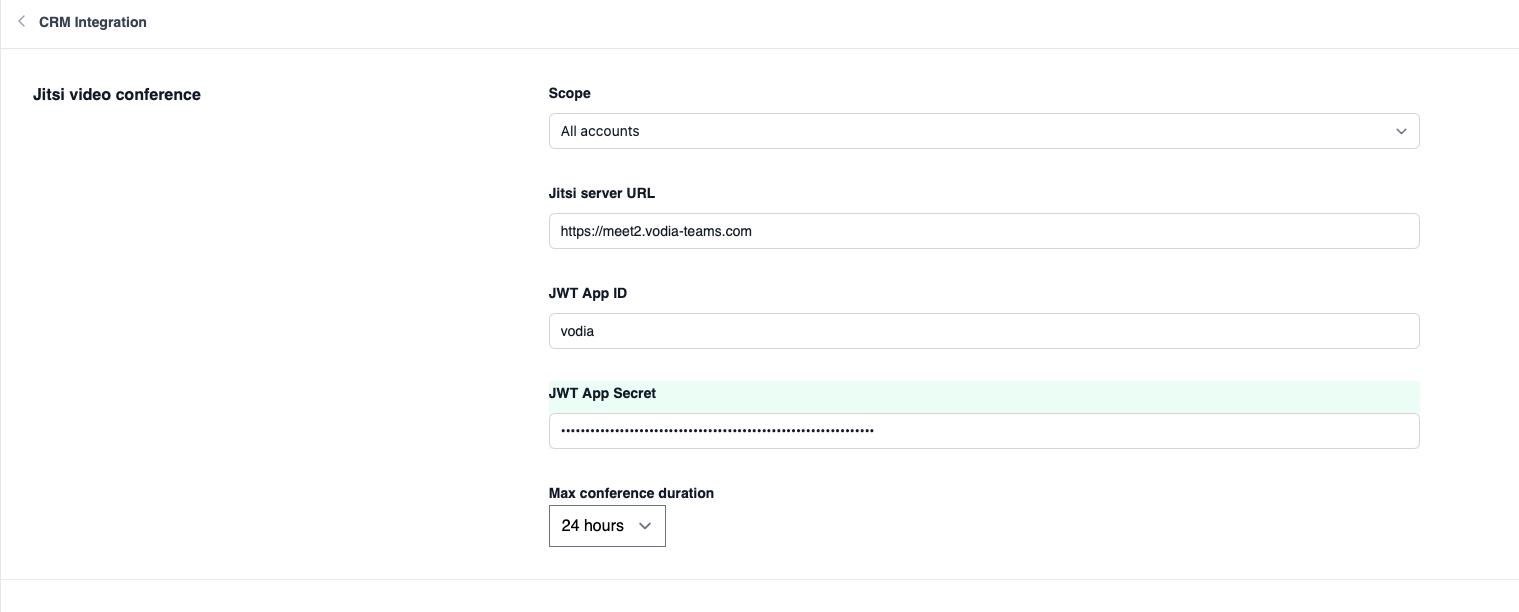
Jitsi brings secure, self-hosted video conferencing directly into the web portal, so users can launch meetings with a single click. Features like JWT-based authentication, automatic room creation tied to extensions, and controlled guest access make it possible to manage video integrations within the same system that already handles voice communication.
The rationale behind our integration with Jitsi
While building V70, we wanted to explore whether video conferencing could be part of the same environment as the phone system, rather than something separate. This is about rethinking where video belongs, and how it should be managed, as part of an overall communication system.
As an open-source video conferencing platform, Jitsi can be deployed within infrastructure controlled by Vodia customers, whether on-premises, in a private cloud environment, or alongside an existing PBX deployment. It doesn’t require a third-party SaaS layer, and it enables voice and video to operate within the same environment, keeping communication within a consistent set of boundaries, instead of splitting it across multiple systems.
The destination of your video calls
With video calls, the audio and video don’t just travel directly between participants. In most instances, they move through infrastructure that sits outside your ecosystem, handling signaling, routing, and often the media itself.
Even with encryption in place, the system running the call is still operated by a third party. This doesn’t automatically make the call insecure, but it does mean the boundaries of the communication are defined elsewhere. For many companies, this isn’t an objectionable arrangement, but for those evaluating video conferencing privacy or managing customer environments, this is something that needs to be clearly understood.
Privacy is more than just encryption
Encryption protects data as it travels between systems, but it doesn’t determine who operates the system, where the data is processed, and how this infrastructure is managed. Two different video conferencing systems, for example, can encrypt data similarly, yet still behave quite differently when it comes to control.
In practice, privacy depends on how the system is deployed:
Video traffic often passes through infrastructure beyond an organization’s environment (though it may appear to be a direct call)
Encryption protects data in transit, but it doesn’t change what entity operates the system handling the communication
Media must be processed somewhere, and this location is what defines the communication boundaries
End-to-end encryption depends on system configuration and isn’t always enabled by default
Control over authentication, access, and routing is as important as the encryption itself
Why this matters for MSPs and IT departments
MSPs and IT teams are responsible for an organization’s entire communication ecosystem - this includes messaging, routing, user access, voice, and, increasingly, video. Each of these components presents its own dependencies, and each dependency has an impact on how data is handled.
Relying on a separate platform for video - with its own infrastructure, policies, and access model - adds another layer to manage. It also makes it harder to answer a simple and crucial question: where does our communication actually reside?
What Jitsi actually resolves (and what it doesn’t)
Jitsi supports encryption by default, and it provides end-to-end encryption in certain scenarios. When Jitsi is deployed as a self-hosted video conferencing solution, it enables users to define how video traffic is handled and the location wherein it’s processed. This doesn’t eliminate risk, however, nor does it make video “fully private” by default.
Group calls are usually routed through a server component. While media is encrypted in transit, it’s still processed within the particular system. End-to-end encryption must be explicitly enabled, and it comes with limitations. As with any browser solution, the client device itself still has access to the media stream. The difference here isn’t that privacy becomes absolute, but that there’s a shift in control of how communication is handled.
Keeping video within your ecosystem
When video is run within your communication ecosystem, rather than alongside it, the way it’s managed changes. Users, authentication, routing, and access policies can remain consistent, and there is no need to introduce separate platforms or additional layers of control.
For IT departments and MSPs managing multiple environments, this reduces fragmentation and makes it easier to understand how communication flows across the system.
Practical thinking about video privacy
It’s an unfortunate truth, but completely risk-free communication systems don’t exist. When building a communication ecosystem, the goal isn’t the elimination of possible exposure, but to understand where control resides and to make informed decisions.
As AI continues to drive communications, particularly data processing, questions about how and where this data is handled are becoming more pressing. Keeping video within the infrastructure you control doesn’t eliminate every risk, but it provides clearer boundaries and reduces reliance on external systems.
Integrating Jitsi into our industry-standard PBX enables users to control their content - there’s no “big brother” feeding content to AI agents, so sensitive information isn’t available to competitors or organizations selling data to the “highest bidder.” In the end, privacy and security shouldn’t be added to your ecosystem - they should be built into it.
If you’re looking at how video fits into your communication environment, or want to explore how this approach would work in your setup, feel free to reach out at sales@vodia.com or +1 (617) 861-3490.
Switching phone systems doesn’t have to mean rebuilding everything from scratch. The Vodia PBX migration tool imports key configuration data from backups, including extensions, ring groups, queues, desk phones, and basic auto-attendant settings. Built into the Vodia Admin Portal, it guides administrators through the import process and reduces repetitive manual work, whether you’re moving 10 extensions or 1,000. Explore what transfers, what needs manual setup, and how the built-in tool reduces repetitive work when moving to Vodia.
Apps have changed how businesses communicate and work, but every digital experience still depends on physical hardware. From smartphones, desk phones, and headsets to networking equipment and cloud servers, reliable infrastructure supports productivity, security, and call quality. Here’s why hardware still matters in an app-first world and what businesses should consider when choosing dependable devices and secure connectivity for the office, hybrid teams, and remote work, while preparing for evolving technology.
Vodia Wallboards gives supervisors, contact centers, service providers, and operations teams a self-hosted, real-time view of Vodia call queue activity. Monitor waiting, ringing, and active calls; agent availability; service levels; abandoned calls; and queue trends across one or more Vodia PBX systems. Start with a ready-made layout or build a custom wallboard using queue filters, live widgets, AI summaries, and alerts. Display the information your teams need in a browser, on an operations dashboard, or on a dedicated TV screen.
.svg)