Traditional Interactive Voice Response (IVR) vs. AI Receptionist
Published on:
June 17, 2026
Traditional IVR and AI receptionists both help businesses manage incoming calls, but they are built for different caller experiences. IVR works well for predictable routing, fixed menus and simple call flows, especially when callers need to reach a department, queue or mailbox. AI receptionists support more natural conversations, smarter responses and more flexible automation, helping callers explain what they need and reach the right outcome faster. The right choice depends on call volume, caller needs, budget and how much personalization your business wants to offer.
Ever since the 1870s, when Alexander Graham Bell invented the telephone, making telephone calls hasn’t changed as much as answering them has. Sure, just about every call we make to someone whose number is already in our phones is a speed dial, but in many cases, especially with a “new” number, we type in the numbers and call. Is this so different from the days of rotary phones, when we dialed numbers on a disk with holes punched in it for each number, or when we pressed the numbers on a princess phone in the 1980s? In theory, not very much. It’s how we answer calls that’s changed.
What began as one person simply picking up the phone grew into switchboards, operators, answering services, answering machines and voicemail. Today, businesses manage incoming calls through more advanced systems designed to answer, route and support callers without relying only on a human receptionist.
Since the first inbound business call, companies large and small have continued to pursue better ways to manage these calls. With digital communications and artificial intelligence now part of the business phone system, two solutions play a major role in handling incoming calls: traditional Interactive Voice Response (IVR) and the AI receptionist.
Let’s take a look at both.
Traditional Interactive Voice Response (IVR)
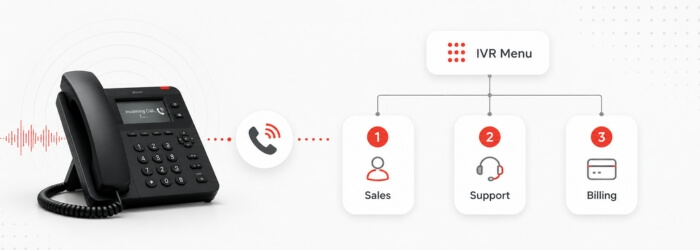
IVR is an automated telephone system technology that answers calls, captures call and caller information, and routes calls, via fixed menus, without the need for a human operator. Most of us experience IVR calls almost every day, particularly when dialing a customer service number - this includes airlines, medical offices, pharmacies, retailers…even restaurants (press “1” to make a reservation, press “2” to speak with a manager…). With many of these calls, a caller must first navigate a menu of options before reaching the appropriate contact or mailbox.
IVR systems give businesses 24-hour reception by blending software with traditional telephony, managing calls in the following manner:
Greeting: The IVR system takes the call and provides a pre-recorded message or system-generated greeting.
Collecting input: The caller presses numbers/symbols on a keypad or answers the IVR prompts aloud.
Processing information: Traditional IVR follows predefined menu options and call flows. More advanced systems may include speech recognition or natural language features, but the caller experience is still usually structured around a fixed path.
Action: IVR can route the call to the appropriate department, extension, mailbox or announcement. In some environments, it can also help with simple self-service actions, such as checking information, confirming details or reaching the right queue.
AI receptionist
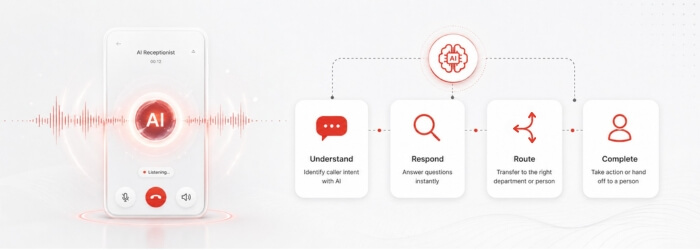
An AI receptionist is an automated, intelligent digital assistant that manages inbound business calls. It uses natural conversational AI to interact with callers in a more human-like way. So the best way to understand how an AI receptionist works might be to imagine how an indefatigable, quick-thinking human receptionist might manage a company’s incoming calls 24 hours per day:
24/7 call management: Calls are handled consistently anytime, day or night, during business hours, after hours or holidays.
Intelligent responses: Depending on the configuration and available information, an AI receptionist can answer common questions and provide callers with relevant guidance without delay.
Task automation: With the right integrations, an AI receptionist can collect caller details, support scheduling workflows, trigger follow-up actions or send information to another system.
Routing: It can move calls to appropriate extensions, capture messages and send calls to human agents when required.
So how to decide if you need traditional IVR or an AI receptionist? Let’s put together some simple lists to help you figure this out.
When should you deploy traditional IVR?
Traditional IVR is an effective choice if your company’s routing needs are predictable and you are working within a tight budget.
Simple routing/transfers: Works best for enterprise/larger corporate environments in which callers need to be sent to a particular department, queue or mailbox, rather than guided through a more conversational experience.
Predictable/repetitive processes: IVR is useful when callers need to undertake simple tasks, such as reaching support, confirming basic information or selecting from a limited set of options.
Budget limitations: IVR is usually less expensive than AI and is a good fit if your organization only requires a basic automated attendant to play a greeting and route a call.
When should you deploy an AI receptionist?
If your operations require a more granular approach to incoming calls and a more natural caller experience, an AI receptionist can take on more than a traditional IVR system.
Scheduling/booking: An AI receptionist can be useful for service businesses (hospitality, healthcare, salons) where callers often need to arrange, change, or cancel appointments, especially when calendar or booking integrations are available.
Reducing abandoned calls: An AI receptionist can answer and engage callers instantly, instead of forcing them to work through a long menu before they reach the right place.
Available 24/7: AI reception can capture leads, handle calls outside business hours, and take messages without the need for human participation.
Personalized answers: Depending on the data and systems connected to it, an AI receptionist can answer questions about availability, particular orders, services, shipping or other business-specific information.
Choosing IVR or an AI receptionist depends on the number of calls you receive, the type of needs and questions your customers have, and what you’re budgeted to spend on your telephony. A blended option works well for some organizations, with a “frontline” IVR to identify a caller, collect basic information, and then route the caller to an AI receptionist to handle detailed inquiries when a conversational experience is needed.
We can help
Vodia PBX gives businesses flexible tools for managing inbound calls, from traditional IVR call flows to AI-powered receptionist scenarios. Whether your organization needs simple menu-based routing, more conversational call handling or a blended approach, Vodia can help you build a setup that fits your operations. Let’s talk, sales@vodia.com, +1 (617) 861-3490.
Vodia PBX now supports xAI’s Grok, giving partners another option for building AI voice agents for their customers. Using Grok’s speech-to-speech API, a Vodia Voice Agent can greet callers, ask who they’d like to speak with and transfer them to the appropriate extension. For example, a caller can simply say they’d like to speak with sales and be connected to the sales team. The article walks through what you need to connect Vodia PBX to Grok and includes a sample call transfer script you can adapt to your own call flow.
Vodia PBX 70.7 brings practical improvements to hotel operations, call quality troubleshooting, outbound dialing, and device provisioning. A new Hotel Front Desk template puts room status, wake-up calls, and guest services in one place, while additional call quality metrics help teams investigate audio issues. Updates to the User Web Portal, reporting schedules, hardware support, and integrations give MSPs, resellers, and service providers more tools to manage deployments and support their customers’ everyday communications.
Vodia is heading to CVx EXPO26, November 17–18 in Glendale, Arizona. Visit Booth 2009 to meet the Vodia team, learn more about our business communications platform, Partner Program, white-label capabilities and the latest V70 developments, and discuss how Vodia can support your customers. The event brings together MSPs, VARs, technology advisors, service providers and other channel professionals, making it a great opportunity to connect directly with the team, ask questions and explore how Vodia can support your business.
.svg)