Improve Customer Experience with Vodia’s Agent Activity Dashboard
Published on:
September 30, 2025
Every missed call or unresolved issue can cost your business, making agent performance critical for call center success. The Vodia Agent Activity Dashboard provides real-time insights into agent availability, queue performance, and call metrics, enabling supervisors to quickly identify performance gaps, optimize productivity, and enhance customer experience. Agents receive actionable feedback and targeted training, while teams gain the visibility needed to manage workloads efficiently and maintain high service standards. With live monitoring, historical analytics, and smart queue indicators, Vodia ensures every customer interaction is handled effectively, helping businesses stay ahead of expectations and deliver exceptional support.
Every missed call or unresolved issue costs your business money. Your agents are the front line, and real-time monitoring can turn performance gaps into growth opportunities. Call centers and enterprises need to monitor agent activity to improve CX and increase productivity. While email and social media have become important ways to contact a company, the telephone is still king when it comes to CX. For most product or service issues, the majority of customers will reach for the phone first.
Why is it necessary to review agent activity?
As the frontline of just about every enterprise, your agents need to be at the top of their game, and they need the support of management to get there. Reviewing agent activity leverages data insights, so both agents and their supervisors can find performance gaps and set goals for improvement; they can also identify areas where further training will be helpful, including empathetic responses and knowledge of products and services. A review of agent activity can spot operational problems, such as routing issues or insufficient CRM integration.
What steps should your company take to review agent activity?
While there are numerous steps you’ll need to take to evaluate your agents’ performance, it’s not a complex operation. First and foremost, you need to be specific as to what you expect - this includes setting benchmarks and goals, both for individual agents and for the call center team. Once this is done, you need software, such as the Vodia PBX, to gather data from call recordings, customer feedback, and real-time calls; you need to then compile this data, in the form of reports and visualizations, to discern patterns and trends. The insights this data provides can be used for further agent training and performance improvement.
Measuring the effectiveness of agent activity
But how does a call center measure the effectiveness of agent activity? Let’s take a look at some of the questions you need to answer.
Adherence and Utilization
Do agents adhere to their work schedules?
What is the ratio of productive calls to idle time?
Productivity
How many calls does an agent take within a set period?
What is the average time an agent spends on a call (average handle time)?
How much time does each agent require to “wrap up” after a call, including entering call data into the CRM?
What is each agent’s rate for resolving issues at first contact with a caller?
Quality and Satisfaction
How satisfied are your customers after speaking with your agents?
Was it easy for customers to resolve their issues during calls?
What scores would you give your agents for following scripts, resolving issues, etcetera?
The Vodia Agent Activity Dashboard
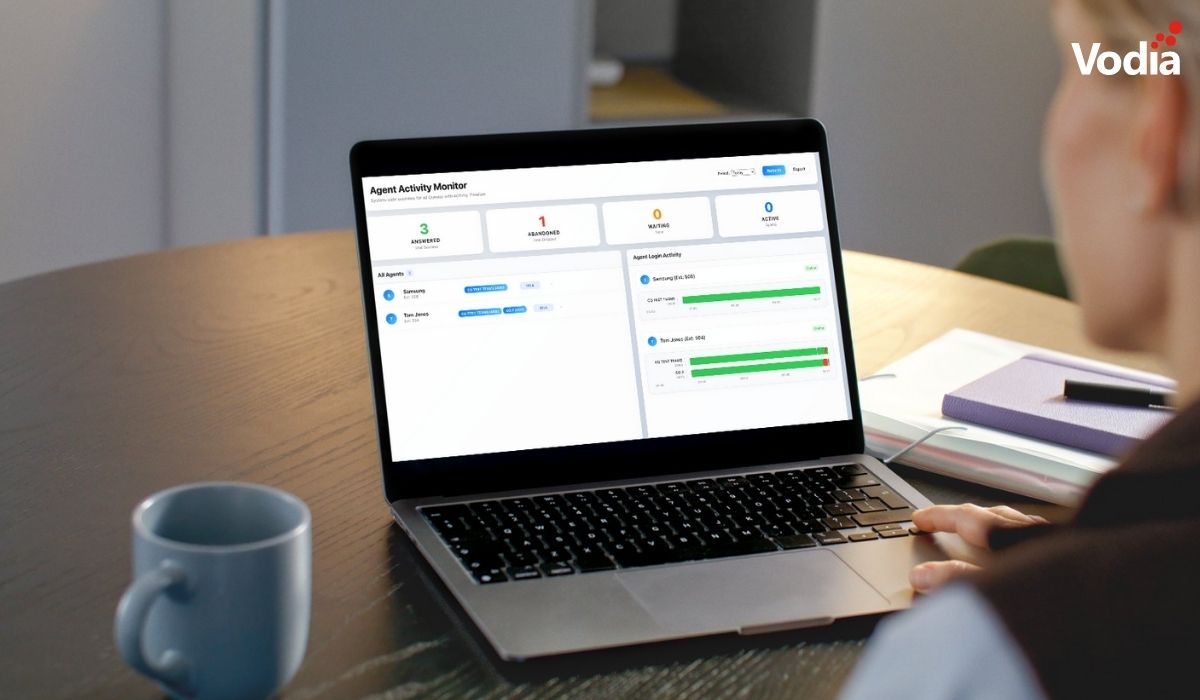
The Vodia Agent Activity Dashboard provides comprehensive real-time monitoring of agent status and queue performance across your call center operations. The dashboard gives supervisors and administrators instant visibility into agent availability, call activity, queue metrics, and historical performance data. It’s a comprehensive solution for measuring - and improving - agent performance.
The Vodia Agent Activity Monitor gives you everything you need to monitor, review, and improve agent performance.
Historical Performance Analytics
Alert indicators: Visual warnings when abandonment rates or wait times exceed normal levels
Call statistics: Track combined answered calls, abandoned calls, and wait times across all queues
Configurable time periods: View data for today, yesterday, this week, or last week
Live Queue Performance
Active call counts: Monitor how many agents are currently handling calls
Current queue length: See how many callers are waiting in each queue
We’ve been the industry’s best call center platform since we began building our PBX over a decade ago. We know what enterprises need to take their call center operations to where they need to be - ahead of their competitors, with true agent management and peerless CX. Our Agent Activity Dashboard is the next step in the evolution of the world’s best phone system. Find out more - email us at sales@vodia.com, or call +1 (617) 861-3490 (United States), +61 2 7201 0788 (APAC), or +49 30 555 78749 (Europe).
Following a critical PHP security advisory affecting installations worldwide, we temporarily restricted public access to some of our backend services while carrying out necessary upgrades. Access has now been restored, and the affected services are operating normally. The Vodia PBX itself does not use PHP and was not directly affected. We explain what happened, the changes to legacy licensing and TLS support, and why customers running older PBX versions should contact us for upgrade guidance.
Submitting a support ticket with the right information helps our team understand your issue and reduces follow-up questions. This step-by-step guide walks you through the Vodia Help Center, from describing the problem and attaching diagnostic files to setting the business impact and providing your PBX details. You’ll also learn which call details and timestamps to include, alongside practical tips to keep troubleshooting focused and help our support team investigate your issue more efficiently.
Switching phone systems doesn’t have to mean rebuilding everything from scratch. The Vodia PBX migration tool imports key configuration data from backups, including extensions, ring groups, queues, desk phones, and basic auto-attendant settings. Built into the Vodia Admin Portal, it guides administrators through the import process and reduces repetitive manual work, whether you’re moving 10 extensions or 1,000. Explore what transfers, what needs manual setup, and how the built-in tool reduces repetitive work when moving to Vodia.
.svg)