Vodia Networks Inc announced today the adoption of JavaScript Object Notation or JSON for its IP-PBX solution and hostedi.am cloud phone service. The new JSON based interface of the Vodia IP-PBX solution will enable integration with Call reporting tools, Property Management System (PMS), Home Automation systems and HVAC remote control.
The most important aspect of designing web applications is the selection of a data format and exchange protocol. Although there are a number of protocols available for data exchange, the choice mainly depends on the requirements of the application and the specific function it provides. Up until recently, the most popular protocol for web data exchange was SOAP which formats the data in an XML payload wrapped within a SOAP envelope. While XML works well for many application scenarios, it has its limits. One such area where XML falls short is when designing web applications that can send data to and retrieve data from a server asynchronously (in the background) without interfering with the display and behavior of the existing page (also known as Ajax).
JavaScript Object Notation (or JSON) provides a standardized data exchange format that is better-suited for Ajax-style web applications. JSON uses human-readable text to transmit data objects between a server and web application, as an alternative to XML. One of the biggest advantages of JSON is that it can be parsed by JavaScript allowing you to write very simple JavaScript code that can import JSON text directly. In the web world, this is a huge advantage compared to competing standards like XML.
Once of the most useful applications of JSON in the PBX context is for exporting CDRs. Vodia PBX now provides the ability to generate JSON based Call Detail Records (CDRs) that can be exported to an external database such as MySQL. Once the CDRs are stored in the database, developers can write their own PHP code to generate call reports from the stored data. Since the JSON CDRs are written directly at the end of each call, reports created in this way are extremely up-to-date and can be used for real-time call reporting tools.
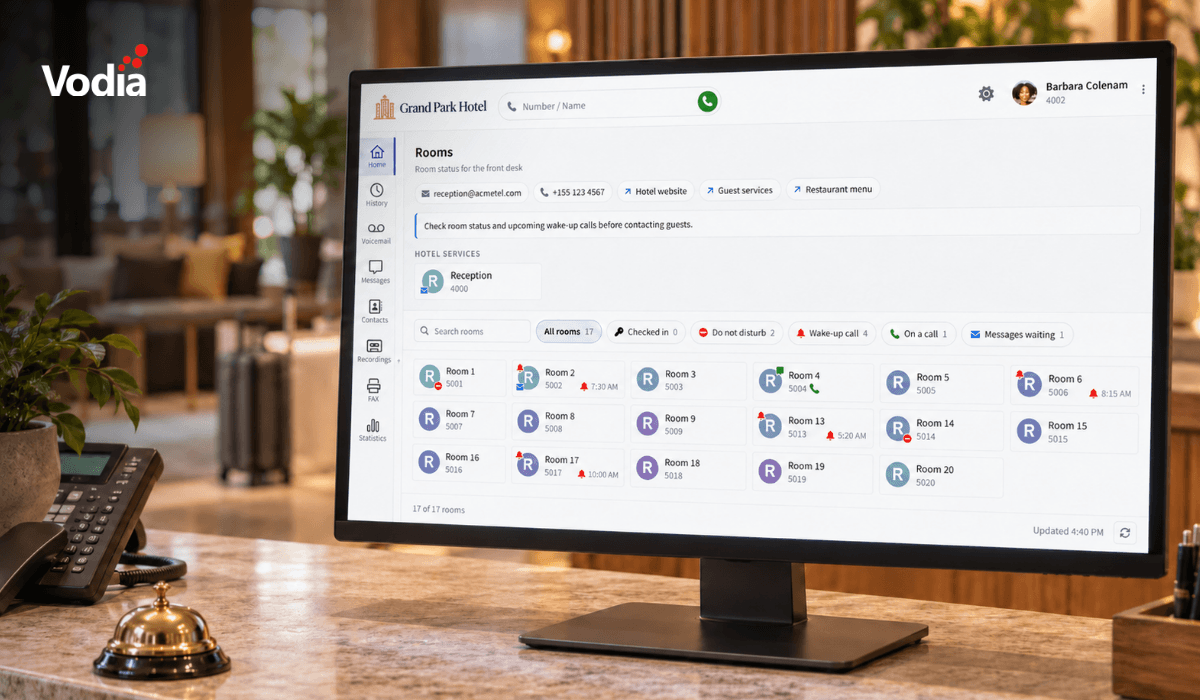
Vodia PBX is also able to use JSON as a data exchange protocol for integration with Property Management Systems (PMS). In the hospitality industry a Property Management System or PMS is a comprehensive software application used to coordinate the operational functions of a hotel. JSON allows Vodia PBX to interface with such Property Management Systems to provide features such as Integrated wakeup, Front desk check-in/check-out, Activation/Deactivation of phones for calls at guest check-in, Activation of guest voicemail box, Cleaning of voice messages in guest voicemail box upon check-out, Do-not-disturb activation/deactivation and Built in room state system for control of room status and maids.
The highly customizable JSON interface of the Vodia PBX can also be used for a number of other applications such as Home Automation and HVAC remote control.
For further details please visit http://www.vodia.com/documentation/actionurl or contact sales@vodia.com.
.svg)